
Everyday living
Create a Bible Reading Plan
Create a Bible reading plan for a year, 100 days or your own schedule, with your choice of books, dates and weekdays.
Print without an account, or save your plan as a PDF or PNG.
How to make your Bible reading plan
- Choose the whole Bible, a Testament or individual books. Mark any chapters already read.
- Set the start and target finish date and your reading weekdays. You can also find a completion date from chapters per day.
- Select Create reading plan and check the passages and amounts by date. Update your progress and dates to generate a new plan when needed.
- Choose output options for the monthly sheet. Print on A4, save a PDF from the print dialog, or download each page as a PNG.
No account is required. Entered progress stays in the current tab; tick completed readings on the printed sheet. See Privacy and Calculation methods.
One-year reading plan and finished samples
A plan to read all 66 books and 1,189 chapters once.
Read every day from January 1 to December 31, 2027: 365 days.
Download the plan shown below as a two-page landscape A4 PDF.
Use the planner above to change dates and weekdays, or to make a 100-day or New Testament plan.
The book names and sheet labels are in English. Chapter-length weights still come from the Korean Revised Version (KRV), using the 66-book Protestant canon; they are not English-translation character counts.
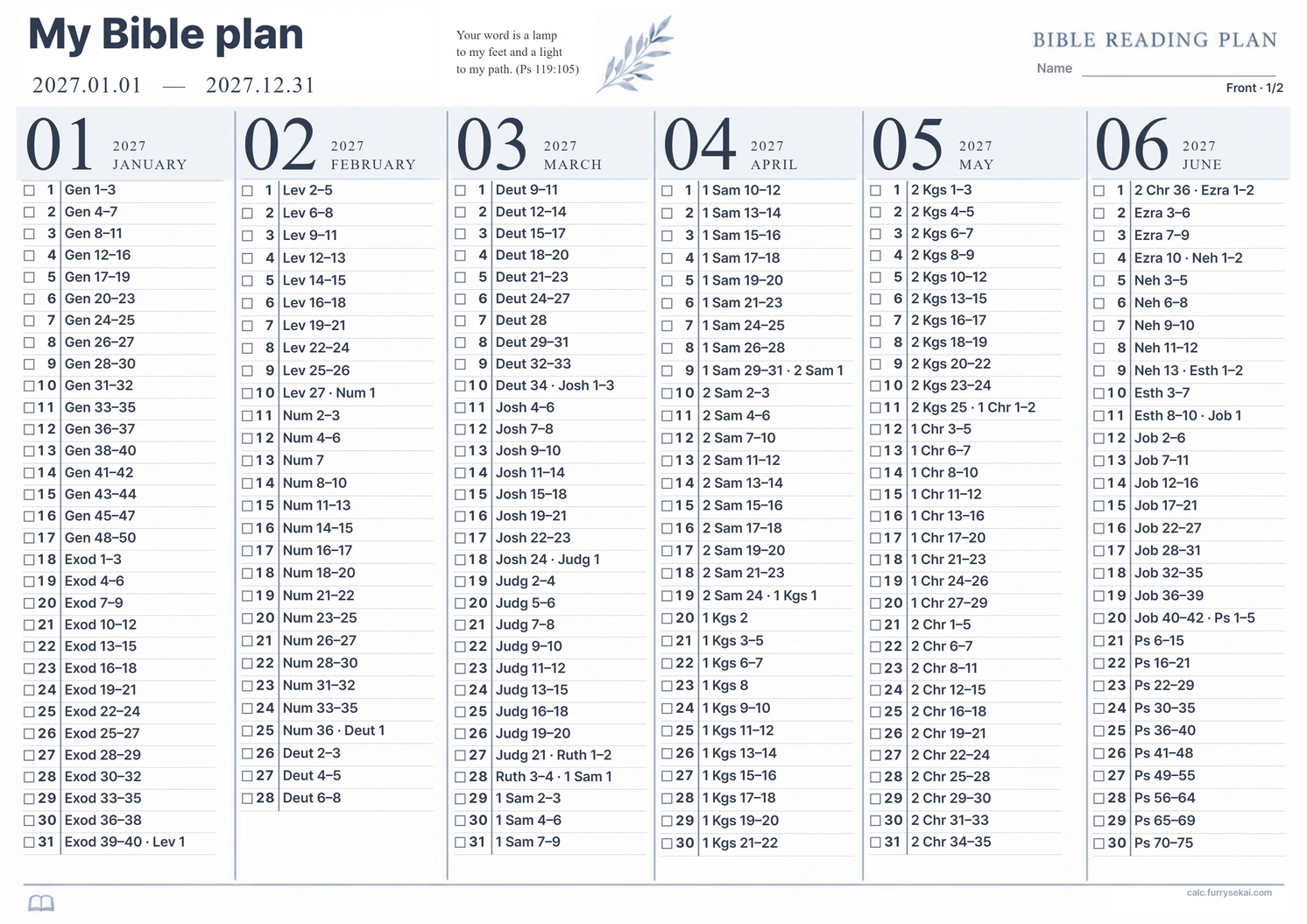
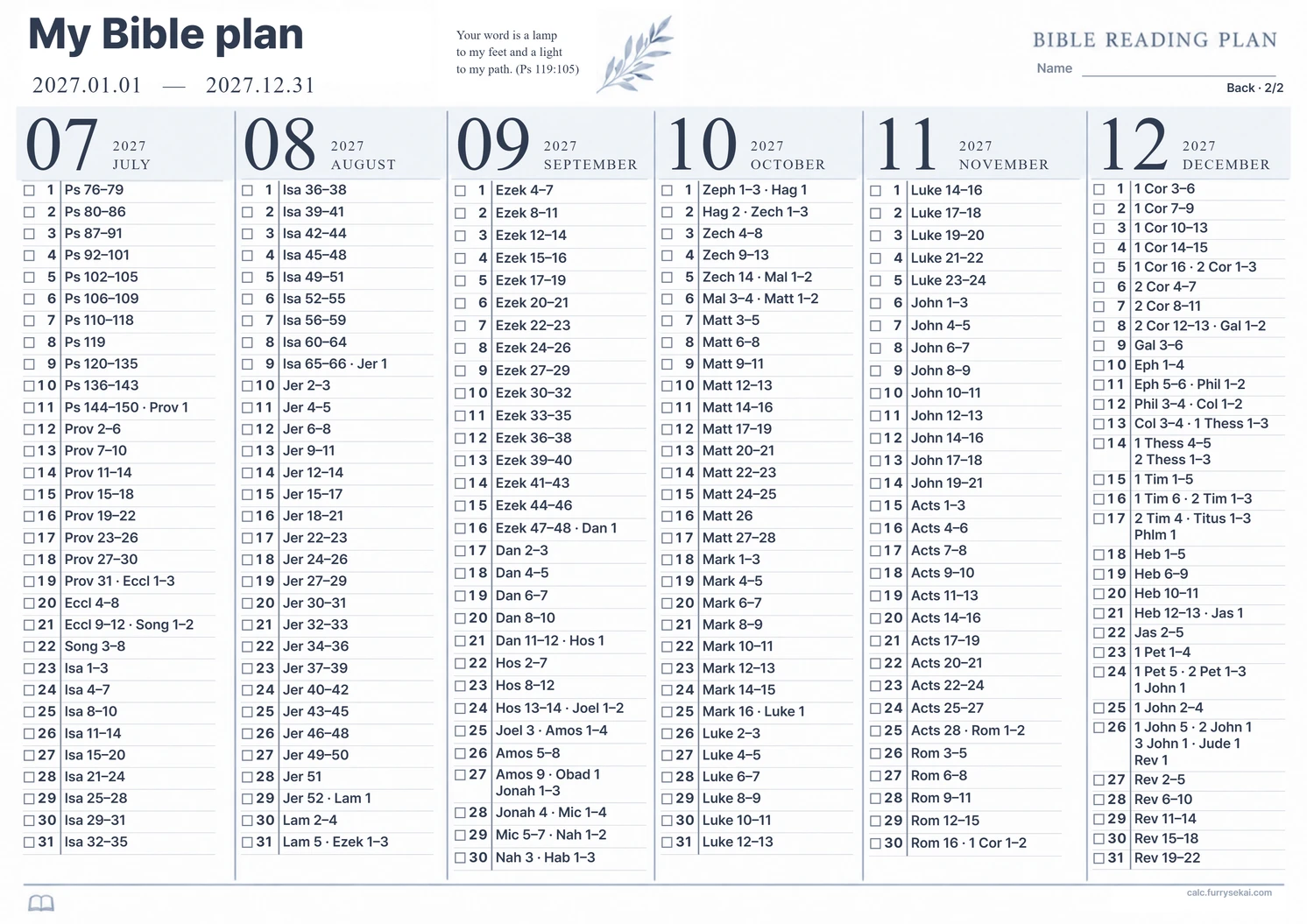
Print settings: landscape A4, 100% scale, headers and footers off. The downloadable PDF uses the fixed 2027 schedule described above.
Formula and assumptions
Chapters vary in length, so the deadline mode balances text-length weights rather than assigning an identical chapter count each day. Chapters stay whole, and a long chapter can still make a day heavier. The average over reading days is shown separately from the average over all calendar dates.
Why the result can vary
The length data is from the Korean Revised Version 1952/1961, not an English translation or another Korean edition. Your edition's actual text length may differ. Character counts do not measure reflection, difficulty or reading time. Only the 66-book Protestant canon is supported.
Example
A 100-day New Testament plan with fixed dates
Inputs: Select the whole New Testament, start from the beginning, use January 1–April 10, 2030, and read every day.
Outcome: All 260 New Testament chapters are assigned once across the 100 inclusive dates. Daily chapter counts can differ because the plan uses KRV chapter text-length weights. Print the monthly A4 sheet or save a PDF or separate PNG pages.
Cautions
- Plans support up to 1,096 days and three readings of the selected books. If the dates and weekdays leave no reading days, adjust the settings.
- Entered progress is used only in the current tab. Keep the plan by printing or saving a PDF or PNG, and tick completed readings on paper.
- This tool does not assess faith, diligence, interpretation or doctrine.
Related calculators
Frequently asked questions
Which Bible edition supplies the chapter weights?
The source is getBible's Korean Revised Version 1952/1961 from Wikisource, in the CrossWire KorRV 2.0.1 family and marked Public Domain by the provider. The Korean Bible Society copyright notice and the electronic-file provider's terms were checked separately. The interface and book names can be English, but the text-length weights remain Korean and can differ from your Bible translation.
Will I read the same number of chapters every day?
The default deadline mode uses chapter text-length weights. A separate mode calculates a completion date from a fixed daily chapter count. Long chapters are not split, so daily text lengths are not perfectly equal.
Where does the plan start if I have read through chapter 13?
Chapter 13 is included in the completed range. The schedule starts with the next unread chapter in your selection. Mark any chapters read separately to leave them out too.
How do I save a PDF?
The one-year PDF is available directly from the download link. It reads the whole Bible every day from January 1 to December 31, 2027, on two landscape A4 pages. For a custom plan, generate it, select Print / Save as PDF, then choose Save as PDF in the browser dialog. Use landscape A4, 100% scale, and disable browser headers and footers.
Is my reading progress saved?
Inputs are used only to build the plan in the current tab. They are not saved to browser storage or an account. Print the finished sheet or save a PDF or PNG to keep it.
Does the sheet change automatically if I miss a few days?
The finished plan stays fixed. Tick completed readings on the printed sheet. To make a new plan, update your actual progress and dates, then select Create reading plan.
Does the printed sheet include advertising or a watermark?
There are no ads. The site address calc.furrysekai.com is always printed in small, pale text at the bottom right.